
9.6 KiB
tyt
Terminal YouTube (tyt) is a small bash script that lets you play YouTube videos by query from the command line. It is created via literate programming, you can find the code below.
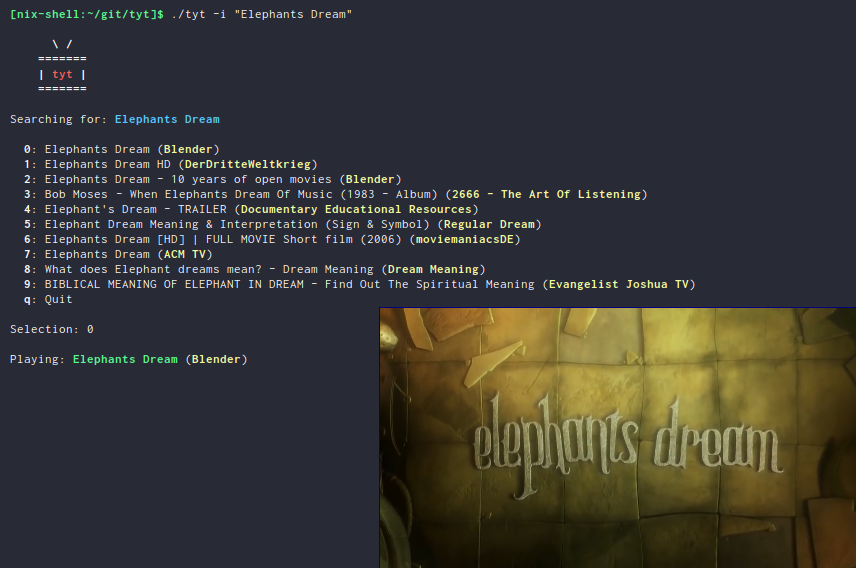
Features
- Search and play videos with one command
- Interactively select a video from a list
- Download a video to the current working directory
There is a --music flag, so you can substitute video with song in the above list.
Execution
This project is a Nix flake. If you have a recent Nix version and flakes are enabled, you can execute the script via:
nix run github:Deleh/tyt -- --help
If you are not running the Nix package manager, you should definitely try it out.
Anyway, this is just a shell script so clone the repo, make sure the dependencies listed below are fulfilled and there you go.
./tyt --help
Dependencies
If you are running tyt as Nix flake you don't have to care about dependencies. A mpv version with scripts is used by default, this enables MPRIS support while playback and skipping sponsored seqments of videos.
These are the dependencies of the script:
If you are not running Nix, make sure those are available on your system and hope that everything works.
Usage
  Usage:
    tyt [options] "<quoted_query>"

  Options:
    -a* --alternative  Play an alternative video (e.g. -aaa for third alternative)
    -h  --help         Show this help message
    -i  --interactive  Interactive mode (overrides --alternative)
    -m  --music        Play only the audio track
    -s  --save         Save video (or audio if -m is provided) to the current directory

  Examples:

    Search for "Elephants Dream" and play the video:
      tyt "Elephants Dream"

    Search for "The Beatles - Yellow Submarine" and play only the music:
      tyt -m "The Beatles - Yellow Submarine"

    Search for "Elephants Dream" interactively and download the selected video:
      tyt -i -s "Elephants Dream"
Script
Dependencies
On the start of the script, it is checked if the dependencies are fulfilled.
  missing_dependencies=false
  if ! command -v jq &> /dev/null
  then
      echo -ne "\e[1mjq\e[0m was not found, please install it\n"
      missing_dependencies=true
  fi
  if ! command -v mpv &> /dev/null
  then
      echo -ne "\e[1mmpv\e[0m was not found, please install it\n"
      missing_dependencies=true
  fi
  if ! command -v youtube-dl &> /dev/null
  then
      echo -ne "\e[1myoutube-dl\e[0m was not found, please install it\n"
      missing_dependencies=true
  fi
  if [ "$missing_dependencies" = true ]
  then
      exit 1
  fi
Usage
This function prints the usage of the script.
  function print_usage {
      echo "Usage:"
      echo "  tyt [options] \"<quoted_query>\""
      echo ""
      echo "Options:"
      echo "  -a* --alternative  Play an alternative video (e.g. -aaa for third alternative)"
      echo "  -h  --help         Show this help message"
      echo "  -i  --interactive  Interactive mode (overrides --alternative)"
      echo "  -m  --music        Play only the audio track"
      echo "  -s  --save         Save video (or audio if -m is provided) to the current directory"
      echo ""
      echo "Examples:"
      echo ""
      echo "  Search for \"Elephants Dream\" and play the video:"
      echo "    tyt \"Elephants Dream\""
      echo ""
      echo "  Search for \"The Beatles - Yellow Submarine\" and play only the music:"
      echo "    tyt -m \"The Beatles - Yellow Submarine\""
      echo ""
      echo "  Search for \"Elephants Dream\" interactively and download the selected video:"
      echo "    tyt -i -s \"Elephants Dream\""
  }
Arguments
At first we parse the arguments. We have the following flags:
-
-a* | --alternative - Alternative video; You can parse any amount of alternatives (e.g.
-aaa) - =-h | –help
- Show a help message
-
-i | --interactive - Interactive mode; Shows the first 10 results and queries for a selection; If this flag is set,
-ais ignored -
-m | --music - Play only the audio track of the video
-
-s | --save - Save the video (or audio if
-mis set) to the current directory
Additionally we have exacly one mandatory quoted string as query.
  alternative=0
  format="flac"
  interactive=false
  music=false
  save=false
  help=false

  for arg in "$@"
  do
    case $arg in
      -a*)
        alternative="${arg:1}"
        alternative="${#alternative}"
        shift
        ;;
      --alternative)
        alternative=1
        shift
        ;;
      -i|--interactive)
        interactive=true
        shift
        ;;
      -m|--music)
        music=true
        shift
        ;;
      -s|--save)
        save=true
        shift
        ;;
      -h|--help)
        help=true
        shift
        ;;
      ,*)
        other_arguments+=("$1")
        shift
        ;;
    esac
  done

  if [ "$help" = true ]
  then
    print_usage
    exit 0
  fi

  if [ "${#other_arguments[@]}" != "1" ]
  then
    print_usage
    exit 1
  fi

  query="${other_arguments[0]}"
Greeter
If the arguments match, print a greeter.
Another greeter is printed if the flag -m is set.
Make sure your terminal emulator supports Unicode to see the notes.
  if [ "$music" = false ]
  then
    echo -ne "\n      \e[1m\ /\e[0m\n"
    echo -ne "    \e[1m=======\e[0m\n"
    echo -ne "    \e[1m| \e[31mtyt\e[0m \e[1m|\e[0m\n"
    echo -ne "    \e[1m=======\e[0m\n\n"
  else
    echo -ne "\n      \e[1m\ /\e[0m     ♫\n"
    echo -ne "    \e[1m=======\e[0m ♫\n"
    echo -ne "    \e[1m| \e[31mtyt\e[0m \e[1m|\e[0m\n"
    echo -ne "    \e[1m=======\e[0m\n\n"
  fi
Get URL and other data
To play a video, we need to get a valid URL. Since there are sometimes parsing errors of the JSON response, we use an endless loop to try until we get a valid response. The first n URLs are saved if an alternative download is requested.
  i=0

  if [ "$interactive" = true ]
  then
    n=10
  else
    n=$((alternative+1))
  fi

  echo -ne "Searching for: \e[34m\e[1m$query\e[0m    \r"

  until results=$(youtube-dl --default-search "ytsearch" -j "ytsearch$n:$query") &> /dev/null
  do

    case $i in
      0)
    appendix="   "
    ;;
      1)
    appendix=".  "
    ;;
      2)
    appendix=".. "
    ;;
      ,*)
    appendix="..."
    ;;
    esac

    echo -ne "Searching for: \e[34m\e[1m$query\e[0m $appendix\r"

    i=$(((i + 1) % 4))
    sleep 1

  done

  echo -ne "Searching for: \e[34m\e[1m$query\e[0m    \n"

  urls=$(echo $results | jq '.webpage_url' | tr -d '"')
  titles=$(echo $results | jq '.fulltitle' | tr -d '"')
  uploaders=$(echo $results | jq '.uploader' | tr -d '"')

  OLDIFS=$IFS
  IFS=$'\n'
  urls=($urls)
  titles=($titles)
  uploaders=($uploaders)
  IFS=$OLDIFS
Interactive selection
If the interactive flag is present, show the first ten results and query for a video to play.
  if [ "$interactive" = true ]
  then
      echo ""
      selections=(0 1 2 3 4 5 6 7 8 9 q)
      for i in "${selections[@]}"
      do
          if [ ! "$i" = "q" ]
          then
              echo -ne "  \e[1m$i\e[0m: ${titles[$i]} (\e[33m\e[1m${uploaders[$i]}\e[0m)\n"
          fi
      done
      echo -ne "  \e[1mq\e[0m: Quit\n"
      echo -ne "\nSelection: "
      read selection
      while [[ ! "${selections[@]}" =~ "${selection}" ]]
      do
          echo -ne "Not valid, try again: "
          read selection
      done
      if [ "$selection" = "q" ]
      then
          exit
      fi
      echo ""
      url=${urls[$selection]}
      title=${titles[$selection]}
      uploader=${uploaders[$selection]}
  else
      url=${urls[$alternative]}
      title=${titles[$alternative]}
      uploader=${uploaders[$alternative]}
  fi
Play or save video
Finally the video is played via mpv or saved via youtube-dl.
If the -m flag is set, only the audio track is played or saved.
In interaction mode, another video is queried to be played.
  function play {
      echo -ne "Playing: \e[32m\e[1m$2\e[0m (\e[33m\e[1m$3\e[0m)\n"
      if [ "$music" = true ]
      then
          mpv --no-video "$1" &> /dev/null
      else
          mpv "$1" &> /dev/null
      fi
  }

  function download {
      echo -ne "Downloading: \e[32m\e[1m$2\e[0m (\e[33m\e[1m$3\e[0m)\n"
      if [ "$music" = true ]
      then
          youtube-dl -x -o "%(title)s.%(ext)s" "$1" &> /dev/null
      else
          youtube-dl -o "%(title)s.%(ext)s" "$1" &> /dev/null
      fi
  }

  if [ "$save" = true ]
  then
      download "$url" "$title" "$uploader"
  else
      play "$url" "$title" "$uploader"

      if [ "$interactive" = true ]
      then
          while :
          do
              echo -ne "\nSelect another or enter [q] to quit: "
              read selection
              while [[ ! "${selections[@]}" =~ "${selection}" ]]
              do
                  echo -ne "Not valid, try again: "
                  read selection
              done
              if [ ! "$selection" = "q" ]
              then
                  echo ""
                  url=${urls[$selection]}
                  title=${titles[$selection]}
                  uploader=${uploaders[$selection]}
                  play "$url" "$title" "$uploader"
              else
                exit
              fi
          done
      fi
  fi