| images | ||
| flake.lock | ||
| flake.nix | ||
| README.org | ||
| tyt | ||

tyt
Terminal YouTube (tyt) is a small bash script that lets you play YouTube videos by query from the command line. It is created via literate programming, you can find the code below.
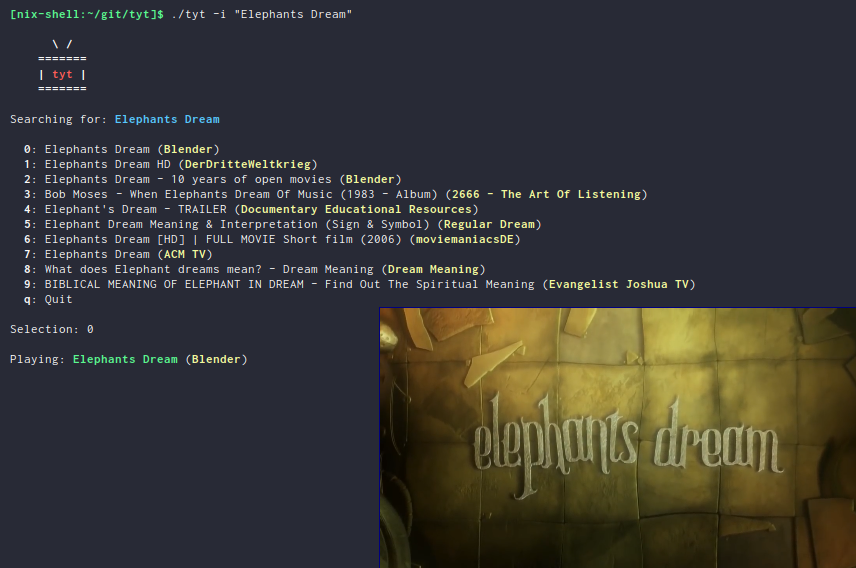
Script
Dependencies
The dependencies of the script are:
Please make sure those are available on your system.
If you are using the Nix package manager, you can run nix-shell in the project directory.
This will drop you into a shell with all requirements fulfilled.
On the start of the script, it is checked if the dependencies are fulfilled.
  missing_dependencies=false
  if ! command -v jq &> /dev/null
  then
      echo -ne "\e[1mjq\e[0m was not found, please install it\n"
      missing_dependencies=true
  fi
  if ! command -v mpv &> /dev/null
  then
      echo -ne "\e[1mmpv\e[0m was not found, please install it\n"
      missing_dependencies=true
  fi
  if ! command -v youtube-dl &> /dev/null
  then
      echo -ne "\e[1myoutube-dl\e[0m was not found, please install it\n"
      missing_dependencies=true
  fi
  if [ "$missing_dependencies" = true ]
  then
      exit 1
  fi
Usage
This function prints the usage of the script.
  function print_usage {
    echo "tyt [ (-a* | --alternative) | (-i | --interactive) | (-m | --music) (-s | --save)] \"QUERY\""
  }
Arguments
At first we parse the arguments. We have the following flags:
-
-a* | --alternative - Alternative video (optional); You can parse any amount of alternatives (e.g.
-aaa) -
-i | --interactive - Interactive mode; Shows the first 10 results and queries for a selection; If this flag is set,
-ais ignored -
-m | --music - Play only the audio track of the video
-
-s | --save - Save the video (or audio if
-mis set) to the current directory
Additionally we have exacly one mandatory quoted string as query.
  alternative=0
  format="flac"
  interactive=false
  music=false
  save=false
  help=false

  for arg in "$@"
  do
    case $arg in
      -a*)
        alternative="${arg:1}"
        alternative="${#alternative}"
        shift
        ;;
      --alternative)
        alternative=1
        shift
        ;;
      -i|--interactive)
        interactive=true
        shift
        ;;
      -m|--music)
        music=true
        shift
        ;;
      -s|--save)
        save=true
        shift
        ;;
      -h|--help)
        help=true
        shift
        ;;
      ,*)
        other_arguments+=("$1")
        shift
        ;;
    esac
  done

  if [ "$help" = true ]
  then
    print_usage
    exit 0
  fi

  if [ "${#other_arguments[@]}" != "1" ]
  then
    print_usage
    exit 1
  fi

  query="${other_arguments[0]}"
Greeter
If the arguments match, print a greeter.
Another greeter is printed if the flag -m is set.
Make sure your terminal emulator supports Unicode to see the notes.
  if [ "$music" = false ]
  then
    echo -ne "\n      \e[1m\ /\e[0m\n"
    echo -ne "    \e[1m=======\e[0m\n"
    echo -ne "    \e[1m| \e[31mtyt\e[0m \e[1m|\e[0m\n"
    echo -ne "    \e[1m=======\e[0m\n\n"
  else
    echo -ne "\n      \e[1m\ /\e[0m     ♫\n"
    echo -ne "    \e[1m=======\e[0m ♫\n"
    echo -ne "    \e[1m| \e[31mtyt\e[0m \e[1m|\e[0m\n"
    echo -ne "    \e[1m=======\e[0m\n\n"
  fi
Get URL and other data
To play a video, we need to get a valid URL. Since there are sometimes parsing errors of the JSON response, we use an endless loop to try until we get a valid response. The first n URLs are saved if an alternative download is requested.
  i=0

  if [ "$interactive" = true ]
  then
    n=10
  else
    n=$((alternative+1))
  fi

  echo -ne "Searching for: \e[34m\e[1m$query\e[0m    \r"

  until results=$(youtube-dl --default-search "ytsearch" -j "ytsearch$n:$query") &> /dev/null
  do

    case $i in
      0)
    appendix="   "
    ;;
      1)
    appendix=".  "
    ;;
      2)
    appendix=".. "
    ;;
      ,*)
    appendix="..."
    ;;
    esac

    echo -ne "Searching for: \e[34m\e[1m$query\e[0m $appendix\r"

    i=$(((i + 1) % 4))
    sleep 1

  done

  echo -ne "Searching for: \e[34m\e[1m$query\e[0m    \n"

  urls=$(echo $results | jq '.webpage_url' | tr -d '"')
  titles=$(echo $results | jq '.fulltitle' | tr -d '"')
  uploaders=$(echo $results | jq '.uploader' | tr -d '"')

  OLDIFS=$IFS
  IFS=$'\n'
  urls=($urls)
  titles=($titles)
  uploaders=($uploaders)
  IFS=$OLDIFS
Interactive selection
If the interactive flag is present, show the first ten results and query for a video to play.
  if [ "$interactive" = true ]
  then
      echo ""
      selections=(0 1 2 3 4 5 6 7 8 9 q)
      for i in "${selections[@]}"
      do
          if [ ! "$i" = "q" ]
          then
              echo -ne "  \e[1m$i\e[0m: ${titles[$i]} (\e[33m\e[1m${uploaders[$i]}\e[0m)\n"
          fi
      done
      echo -ne "  \e[1mq\e[0m: Quit\n"
      echo -ne "\nSelection: "
      read selection
      while [[ ! "${selections[@]}" =~ "${selection}" ]]
      do
          echo -ne "Not valid, try again: "
          read selection
      done
      if [ "$selection" = "q" ]
      then
          exit
      fi
      echo ""
      url=${urls[$selection]}
      title=${titles[$selection]}
      uploader=${uploaders[$selection]}
  else
      url=${urls[$alternative]}
      title=${titles[$alternative]}
      uploader=${uploaders[$alternative]}
  fi
Play or save video
Finally the video is played via mpv or saved via youtube-dl.
If the -m flag is set, only the audio track is played or saved.
In interaction mode, another video is queried to be played.
  function play {
      echo -ne "Playing: \e[32m\e[1m$2\e[0m (\e[33m\e[1m$3\e[0m)\n"
      if [ "$music" = true ]
      then
          mpv --no-video "$1" &> /dev/null
      else
          mpv "$1" &> /dev/null
      fi
  }

  function download {
      echo -ne "Downloading: \e[32m\e[1m$2\e[0m (\e[33m\e[1m$3\e[0m)\n"
      if [ "$music" = true ]
      then
          youtube-dl -x -o "%(title)s.%(ext)s" "$1" &> /dev/null
      else
          youtube-dl -o "%(title)s.%(ext)s" "$1" &> /dev/null
      fi
  }

  if [ "$save" = true ]
  then
      download "$url" "$title" "$uploader"
  else
      play "$url" "$title" "$uploader"

      if [ "$interactive" = true ]
      then
          while :
          do
              echo -ne "\nSelect another or enter [q] to quit: "
              read selection
              while [[ ! "${selections[@]}" =~ "${selection}" ]]
              do
                  echo -ne "Not valid, try again: "
                  read selection
              done
              if [ ! "$selection" = "q" ]
              then
                  echo ""
                  url=${urls[$selection]}
                  title=${titles[$selection]}
                  uploader=${uploaders[$selection]}
                  play "$url" "$title" "$uploader"
              else
                exit
              fi
          done
      fi
  fi