- Python 51.4%
- Nix 27.2%
- HTML 9.4%
- CSS 8.5%
- Dockerfile 3.5%
| images | ||
| raincloud | ||
| .gitignore | ||
| Dockerfile | ||
| flake.lock | ||
| flake.nix | ||
| LICENSE | ||
| MANIFEST.in | ||
| README.org | ||
| setup.py | ||

raincloud
A self-hosted file sharing cloud for you and your friends.
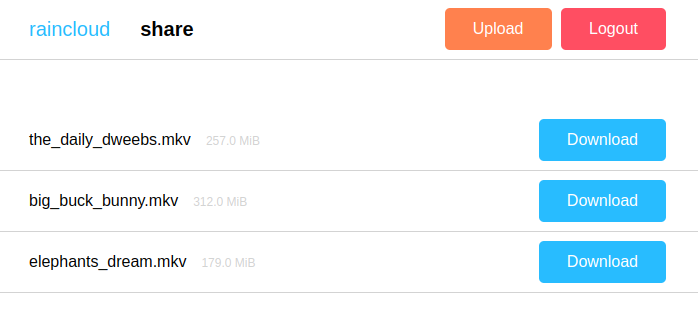
Your friends don't use tools like magic-wormhole and you don't want to upload private data to third party file hosters? You want to save a file from a computer that doesn't belong to you and forgot your USB flash drive? raincloud solves those problems by providing a simple self-hosted file sharing platform.
Features
- No users, just password protectable dynamic HTTP routes
- Routes are defined by a flat directory structure
- Permissions per route individually configurable via plain-text files
Example
Assuming you host raincloud at https://cloud.example.com and it is configured to run on /var/www/public with the following directory structure:
  /var/www/public
  ├── alice
  │   ├── big_buck_bunny.mkv
  │   ├── elephants_dream.mkv
  │   ├── rc.conf
  │   └── the_daily_dweebs.mkv
  └── inbox
      ├── logo.svg
      └── rc.conf
Then the following two routes exist:
https://cloud.example.com/alicehttps://cloud.example.com/inbox
This is determined by the presence of a rc.conf file in subdirectories in which the individual permissions for the routes can be set.
The configuration options can be seen below.
All other routes, including http://cloud.example.com, return 404 Not Found.
Installation
Execute the following command in the repository to install the raincloud module in your environment:
$ pip install .
Deployment
First set up a Redis server which will be used for server-side session caching. Then a WSGI server like Gunicorn can be used to serve raincloud for example like this:
$ gunicorn "raincloud:create_app(base_path='public', secret_key_path='secret_key', redis_url='redis://127.0.0.1:6379/0')"
NixOS
This repository is also a Nix Flake which provides a NixOS module. It requires a running instance of a Redis server. A minimal raincloud instance can be setup for example like this:
  raincloud.nixosModule {
    services.raincloud = {
      enable = true;
      basePath = "/var/lib/raincloud";
      secretKeyPath = "/var/lib/raincloud/secret_key";
      redisUrl = "unix:/run/redis-raincloud/redis.sock?db=0";
    };
  }
All configuration options are:
| Option | Description | Type | Default value | Example |
|---|---|---|---|---|
address |
Bind address of the server | str |
127.0.0.1 |
0.0.0.0 |
port |
Port on which the server listens | int |
8000 |
5000 |
user |
User under which the server runs | str |
raincloud |
alice |
group |
Group under which the server runs | str |
raincloud |
users |
cloudName |
Name of the raincloud | str |
raincloud |
bobsCloud |
basePath |
Base path of the raincloud | str |
/var/lib/raincloud |
|
secretKeyPath |
Path to file containing Flask secret key | str |
/var/lib/raincloud/secret_key |
|
redisUrl |
URL of Redis database | str |
redis://127.0.0.1:6379/0 |
unix:/run/redis-raincloud/redis.sock?db=0 |
numWorkers |
Number of Gunicorn workers (recommendation is: 2 x #CPUs + 1) | int |
5 |
17 |
workerTimeout |
Gunicorn worker timeout | int |
300 |
360 |
Docker
A Dockerfile, based on Alpine Linux, is available in the repository.
You can build a local raincloud image with the following command:
$ docker build -t raincloud:latest github.com/Deleh/raincloud
A container of the image exposes raincloud at port 8000 and uses the base directory /var/www/raincloud.
Use Dockers -p flag to map the port on your host and -v flag to mount a local base directory:
$ docker run -p <local_port>:8000 -v <path_to_local_base_directory>:/var/www/raincloud raincloud:latest
If you want to change the cloud name you can pass the cloud_name environment variable to the container:
$ docker run -p <local_port>:8000 -v <path_to_local_base_directory>:/var/www/raincloud -e "cloud_name=podcloud" raincloud:latest
The environment variables num_workers (default: 5) and worker_timeout (default: 300) can be set in the same way to set the number of Gunicorn workers and their timeout in seconds.
Configuration
raincloud provides four configuration options which can be passed to raincloud.create_app():
-
base_path - Base path of the raincloud
-
secret_key_path - Path to file containing Flask secret key
-
redis_url - URL of redis database (default:
redis://127.0.0.1:6379/0) -
cloud_name - Cloud name (default:
raincloud)
Set them for example like this:
>>> app = raincloud.create_app(base_path='/home/alice/public', secret_key_path='/var/lib/raincloud/secret_key', redis_url='redis://127.0.0.1:6379/0', cloud_name='raincloud')
rc.conf
A rc.conf file looks like the following snippet and can contain up to three configuration parameters after the [raincloud] section:
  [raincloud]

  # Insert a password hash to enable password protection for this directory
  # Use one of the following commands to create a hash:
  #   mkpasswd -m sha-256
  #   mkpasswd -m sha-512
  #
  #hashed_password =

  # Set this to 'true' to allow file downloads from this directory
  download = false

  # Set this to 'true' to allow file uploads to this directory
  upload = false
Troubleshooting
The filesize which can be uploaded may be limited by your web server. When using Nginx for example, the following configuration parameter can be used to increase the upload files size or don't restrict it at all:
client_max_body_size 100M;
client_max_body_size 0;
Similarly the maximum download file size can be disabled with:
proxy_max_temp_file_size 0;
A network timeout may also be issued by a WSGI server.
With Gunicorn for example the timeout can be increased with the --timeout argument.
Are you getting internal server errors?
Check the directory permissions.
The user which runs raincloud must have at least read permissions to allow downloads and execute permissions to allow uploads.