
1.1 KiB
1.1 KiB
gis
gis is a Bash script which shows a status summary of multiple Git repositories.
It was inspired by wstool, vcstool and the default Starship prompt.
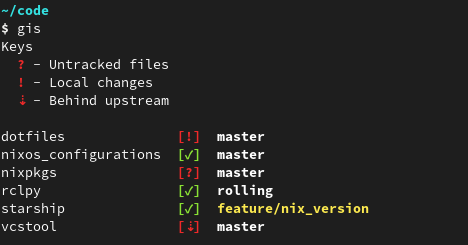
Usage
  Usage: gis [OPTIONS] [PATHS] ...

  Get status information about all Git repositories in PATHS.
  The colon-seperated environment variable $GIS_PATH is used if no PATH is given.
  If the variable isn't set, the current work directory is used.

  OPTIONS
    -f, --fetch  Execute 'git fetch --prune --all' for all repositories in PATHS
    -h, --help   Show this help message and exit
Installation
Place the gis script somewhere in your $PATH or use the provided install.{bash,zsh} scripts.
Those will create a symlink in ~/.local/bin and update the respective ~/.{bash,zsh}rc.
Nix Flake
This repository is also a Nix Flake.
gis is provided as package under github:Deleh/gis#gis.